文档预处理指的是将原始文档进行加载、解析,并转换为能够统一处理的标准化格式。 在这一步中,我们首先要将文档按照不同的类型加载,并转换成统一格式document,然后还需要去除文档中存在的大量无效内容,比如多余的空格、换行符、无意义的特殊符号、重复的内容等;最后还可能需要规范化文本格式,例如统一编码格式、统一大小写等。 文档预处理的目标,是让后续的“分片”和“向量化”能够在干净的数据上进行,从源头上保证知识库索引的质量。 文档预处理是构建高质量知识库的基础,它主要包含两个关键步骤:文档读取和数据清洗。 下面的代码基于SpringAI 1.1.0 版本。
文档读取
本文测试用到的文档: https://nfturbo-file.oss-cn-hangzhou.aliyuncs.com/llm/RAG%E6%9D%90%E6%96%99.zip 文档读取是将原始文档加载、解析,并转换为统一的结构化格式。在这一阶段,我们需要根据文档类型选择合适的解析工具,将不同格式的文档类型(如 TXT、PDF、Word、HTML、Markdown 等等)统一处理为可供后续处理的标准化格式。SpringAI 已经为我们提供了大量的读取器,拿来即用。这些读取器都来自——DocumentReader 在 Spring AI中,DocumentReader 是一个用于从各种格式的文档中提取文本内容并将其转换为 Document 对象的核心组件。这些 Document 对象随后可以被用于向量嵌入(embedding)、语义搜索、RAG(Retrieval-Augmented Generation)等 AI 应用场景。他的主要作用: - 统一读取接口:提供标准化方式从不同来源(如 PDF、Word、TXT、HTML、Markdown 等)加载原始文本。 - 结构化输出:将原始内容封装为 org.springframework.ai.document.Document 对象,包含: - content:文档的文本内容 - metadata:元数据(如文件名、页码、来源 URL、创建时间等) - 支持扩展:开发者可自定义实现特定格式的解析器。 目前主要的实现可以通过这个接口有哪些实现来看(https://docs.spring.io/spring-ai/docs/current/api/org/springframework/ai/document/class-use/DocumentReader.html ): 不管是哪种服务器,只需要创建出来之后,调用read/get方法,就能得到一个Document的List。其实就是针对文档被加载后的对象。接着就可以基于这些Document做处理了。
策略接口
由于我们的文档格式是多变的,直接针对每种格式写单独的读取逻辑会有大量if-else的代码,导致代码重复、维护困难,同时也不利于扩展。为了解决这种问题,我们可以定义一个策略接口,用于动态路由到具体的文档读取器来解析各自的文档类型。
public interface DocumentReaderStrategy {
    /**
     * 判断是否支持该文件
     */
    boolean supports(File file);

    /**
     * 读取文件并返回 Document 列表
     */
    List<Document> read(File file) throws IOException;
}
文本读取器
直接读取文件内容,无需额外解析,适合简单文本,如txt文件。springai-commons包自带解析器。
@Component
public class TextReaderStrategy implements DocumentReaderStrategy {

    @Override
    public boolean supports(File file) {
        String name = file.getName().toLowerCase();
        return name.endsWith(".txt") || name.endsWith(".tex") || name.endsWith(".text");
    }

    @Override
    public List<Document> read(File file) throws IOException {
        Resource resource = new FileSystemResource(file);
        return new TextReader(resource).get();
    }
}
PDF读取器
专业的PDF文件解析器,支持按页提取文本,可删除页眉、页脚,支持分页生成多个 Document。
<dependency>
  <groupId>org.springframework.ai</groupId>
  <artifactId>spring-ai-pdf-document-reader</artifactId>
  <version>1.1.0</version>

</dependency>
这个包里面提供了两个reader:ParagraphPdfDocumentReader、PagePdfDocumentReader 他俩的区别是,PagePdfDocumentReader 是“按页切分”,而 ParagraphPdfDocumentReader 是“按语义段落切分”。 在 rag 中,如果你需要实现 PDF 读取策略,通常建议: 建议优先考虑使用ParagraphPdfDocumentReader,因为它能够更好地保留信息的完整性。段落通常是一个完整的意思表达,这对于 LLM 理解上下文非常有帮助。但是他非常依赖PDF 本身的质量。如果 PDF 是扫描件或者没有良好的内部结构标记,它的效果可能不理想甚至回退到按行读取。
@Component
public class PdfReaderStrategy implements DocumentReaderStrategy {

    @Override
    public boolean supports(File file) {
        return file.getName().toLowerCase().endsWith(".pdf");
    }

    @Override
    public List<Document> read(File file) throws IOException {
        // 读取配置
        PdfDocumentReaderConfig config = PdfDocumentReaderConfig.builder()
                .withPageTopMargin(50)         // 忽略顶部50个单位的页眉
                .withPageBottomMargin(50)      // 忽略底部50个单位的页脚
                .withPagesPerDocument(1)       // 每一页作为一个 Document
                .withPageExtractedTextFormatter(new ExtractedTextFormatter.Builder()
                        .withNumberOfTopTextLinesToDelete(0) // 每页再额外删掉前0行
                        .build())
                .build();

        Resource resource = new FileSystemResource(file);
        return new PagePdfDocumentReader(resource, config).get();
    }
}
HTML读取器
基于Jsoup HTML解析器,可以使用selector选择器指定提取网页标签内容。
<dependency>
  <groupId>org.springframework.ai</groupId>
  <artifactId>spring-ai-jsoup-document-reader</artifactId>
 <version>1.1.0</version>

</dependency>
@Component
public class HtmlReaderStrategy implements DocumentReaderStrategy {

    @Override
    public boolean supports(File file) {
        String name = file.getName().toLowerCase();
        return name.endsWith(".html") || name.endsWith(".htm");
    }

    @Override
    public List<Document> read(File file) throws IOException {
        // 读取配置
        JsoupDocumentReaderConfig config = JsoupDocumentReaderConfig.builder()
                // 只提取p标签段落
                .selector("p")
                // 文件编码
                .charset("UTF-8")
                // 包含超链接
                .includeLinkUrls(true)
                // 提取meta标签的元数据
                .metadataTags(List.of("author", "date"))
                // 添加自定义元数据
                .additionalMetadata("filename", file.getName())
                .build();
        Resource resource = new FileSystemResource(file);
        return new JsoupDocumentReader(resource, config).get();
    }
}
Markdown读取器
支持按标题或水平分割线分片,可以选择性的包含代码块或引用内容。
<dependency>
  <groupId>org.springframework.ai</groupId>
  <artifactId>spring-ai-markdown-document-reader</artifactId>
  <version>1.1.0</version>

</dependency>
@Component
public class MarkdownReaderStrategy implements DocumentReaderStrategy {

    @Override
    public boolean supports(File file) {
        String name = file.getName().toLowerCase();
        return name.endsWith(".md");
    }

    @Override
    public List<Document> read(File file) throws IOException {
        // 读取配置
        MarkdownDocumentReaderConfig config = MarkdownDocumentReaderConfig.builder()
                // 水平线分割生成新文档
                .withHorizontalRuleCreateDocument(true)
                // 不包含代码块
                .withIncludeCodeBlock(false)
                // 不包含引用
                .withIncludeBlockquote(false)
                // 添加文件名元数据
                .withAdditionalMetadata("filename", file.getName())
                .build();
        Resource resource = new FileSystemResource(file);
        return new MarkdownDocumentReader(resource, config).get();
    }
}
JSON读取器
可处理JSON数组或对象,但不支持JSON嵌套字段,比较适合简单的JSON文件,如果文件本身比较复杂还是建议使用jackson、fastjson等专业的json工具来手动处理。
@Component
public class JsonReaderStrategy implements DocumentReaderStrategy {

    public boolean supports(File file) {
        String name = file.getName().toLowerCase();
        return name.endsWith(".json");
    }

    @Override
    public List<Document> read(File file) throws IOException {
        Resource resource = new FileSystemResource(file);
        // 假设目标提取json的两个字段description和content
        JsonReader jsonReader = new JsonReader(resource, "description", "content");
        return jsonReader.get();
    }
}
通用Tika读取器
一种通用文件处理器,可以处理大部分常见文档格式,如word、pdf、ppt等等,可以自动识别文档类型并提取文本和元数据。
<dependency>
  <groupId>org.springframework.ai</groupId>
  <artifactId>spring-ai-tika-document-reader</artifactId>
  <version>1.1.0</version>

</dependency>
@Component
public class TikaReaderStrategy implements DocumentReaderStrategy {

    @Override
    public boolean supports(File file) {
        String name = file.getName().toLowerCase();
        return name.endsWith(".doc") || name.endsWith(".docx");
    }

    @Override
    public List<Document> read(File file) throws IOException {
        Resource resource = new FileSystemResource(file);
        return new TikaDocumentReader(resource).get();
    }
}
策略选择器
@Service
public class DocumentReaderStrategySelector {

    private final List<DocumentReaderStrategy> strategies;

    public DocumentReaderStrategySelector(List<DocumentReaderStrategy> strategies) {
        this.strategies = strategies;
    }

    public List<Document> read(File file) throws IOException {
        for (DocumentReaderStrategy strategy : strategies) {
            if (strategy.supports(file)) {
                return strategy.read(file);
            }
        }
        throw new IllegalArgumentException("不支持的文件类型: " + file.getName());
    }
}
测试接口
@RestController
@RequestMapping("/rag")
public class RagController {

    private final DocumentReaderStrategySelector selector;

    @Autowired
    public RagController(DocumentReaderStrategySelector selector) {
        this.selector = selector;
    }

    /**
     * 读取文件
     */
    @GetMapping("/read")
    public List<Document> readDocument(@RequestParam("path") String path) {
        File file = new File(path);
        if (!file.exists() || !file.isFile()) {
            throw new IllegalArgumentException("文件不存在或不是有效文件: " + path);
        }
        try {
            return selector.read(file);
        } catch (IOException e) {
            throw new RuntimeException("读取文件失败: " + e.getMessage(), e);
        }
    }
}
调用示例
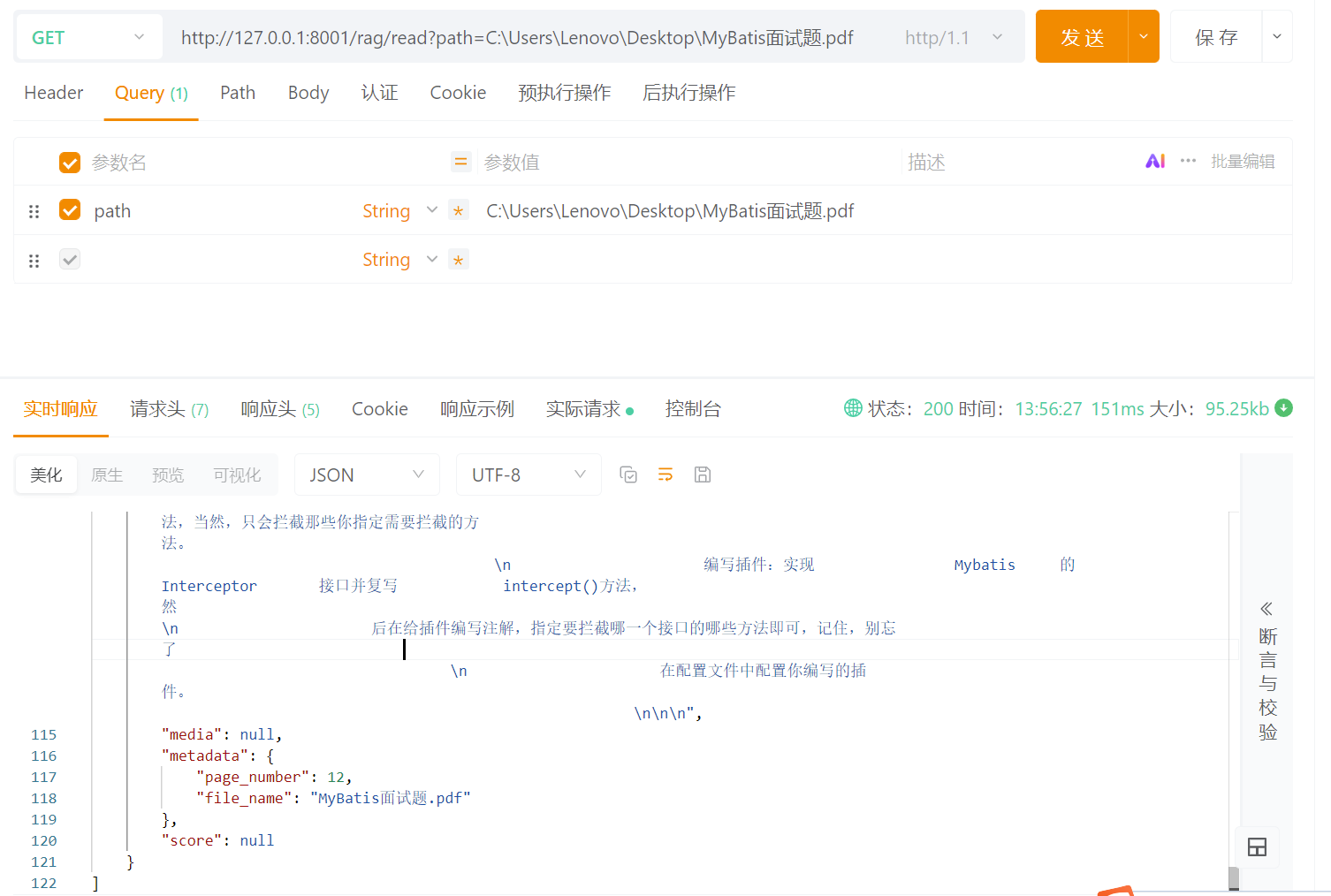
以一篇PDF文档为例,可以看到已经成功将文档解析了出来,包含了文档的内容和元数据。
根据选择器的路由,此PDF文档被交给了PDF读取器进行处理,我们之前在PDF读取器中设置了withPagesPerDocument参数,所以生成的结果是每页一个document。
数据清洗
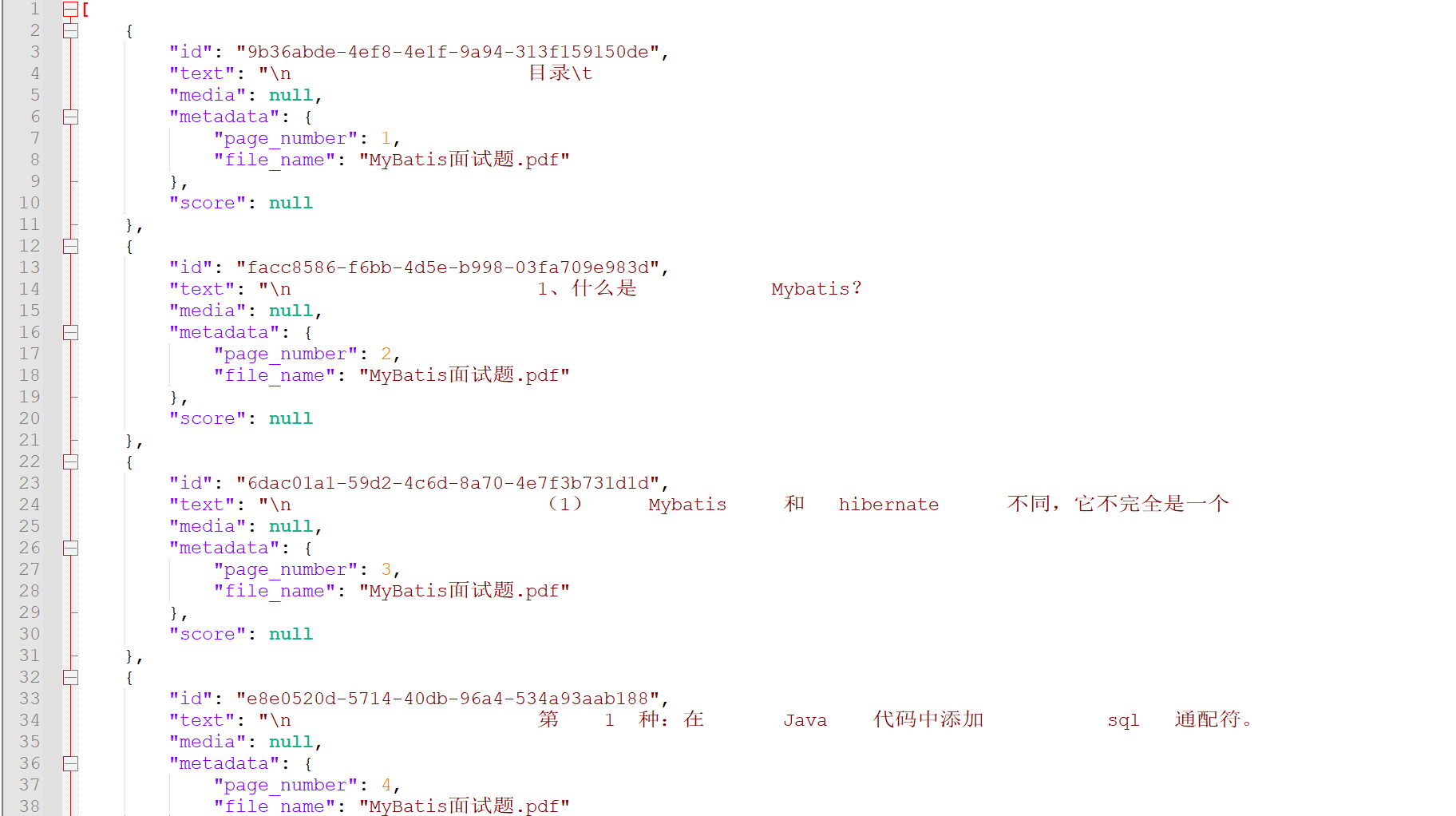
在前面的步骤中,我们已成功实现文档读取功能。然而,读取结果往往包含大量无效干扰字符(下图就是调用示例的响应结果),因此需要进行数据清洗。数据清洗是对文本内容进行整理和优化的过程,包括去除多余空格、换行符、无意义的特殊符号和重复内容等。通过清洗,后续的文档分片和向量化操作可以在干净、一致的数据上进行,从源头提升知识库的质量与检索效果。
document清洗
这边列举了几种常见的清洗手段,实际上你可以根据自己的文档数据、业务需求,定制化的开发清洗策略。
@GetMapping("/read")
public List<Document> readDocument(@RequestParam("path") String path) {
    File file = new File(path);
    if (!file.exists() || !file.isFile()) {
        throw new IllegalArgumentException("文件不存在或不是有效文件: " + path);
    }
    try {

        List<Document> documents = selector.read(file);

        return cleanDocuments(documents);

    } catch (IOException e) {
        throw new RuntimeException("读取文件失败: " + e.getMessage(), e);
    }
}

/**
 * 文本清洗
 */
public List<Document> cleanDocuments(List<Document> documents) {
    if (CollectionUtils.isEmpty(documents)) {
        return documents;
    }

    return documents.stream()
    .map(doc -> {
        if (doc == null || doc.getText() == null) {
            return doc;
        }

        String text = doc.getText();

        // 1. 去掉多余空白字符(空格、制表符、换行等)
        text = text.replaceAll("\\s+", " ").trim();

        // 2. 去掉无意义的乱码或特殊符号
        text = text.replaceAll("[^\\p{L}\\p{N}\\p{P}\\p{Z}\\n]", "");

        // 3. 可选:统一大小写
        // text = text.toLowerCase();

        // 4. 按换行拆分段落,去除重复段落
        String[] paragraphs = text.split("\\n+");
        Set<String> seen = new LinkedHashSet<>();
        for (String para : paragraphs) {
            String trimmed = para.trim();
            if (!trimmed.isEmpty()) {
                seen.add(trimmed);
            }
        }

        text = String.join("\n", seen);

        return new Document(text);
    })
    .collect(Collectors.toList());
}
调用示例
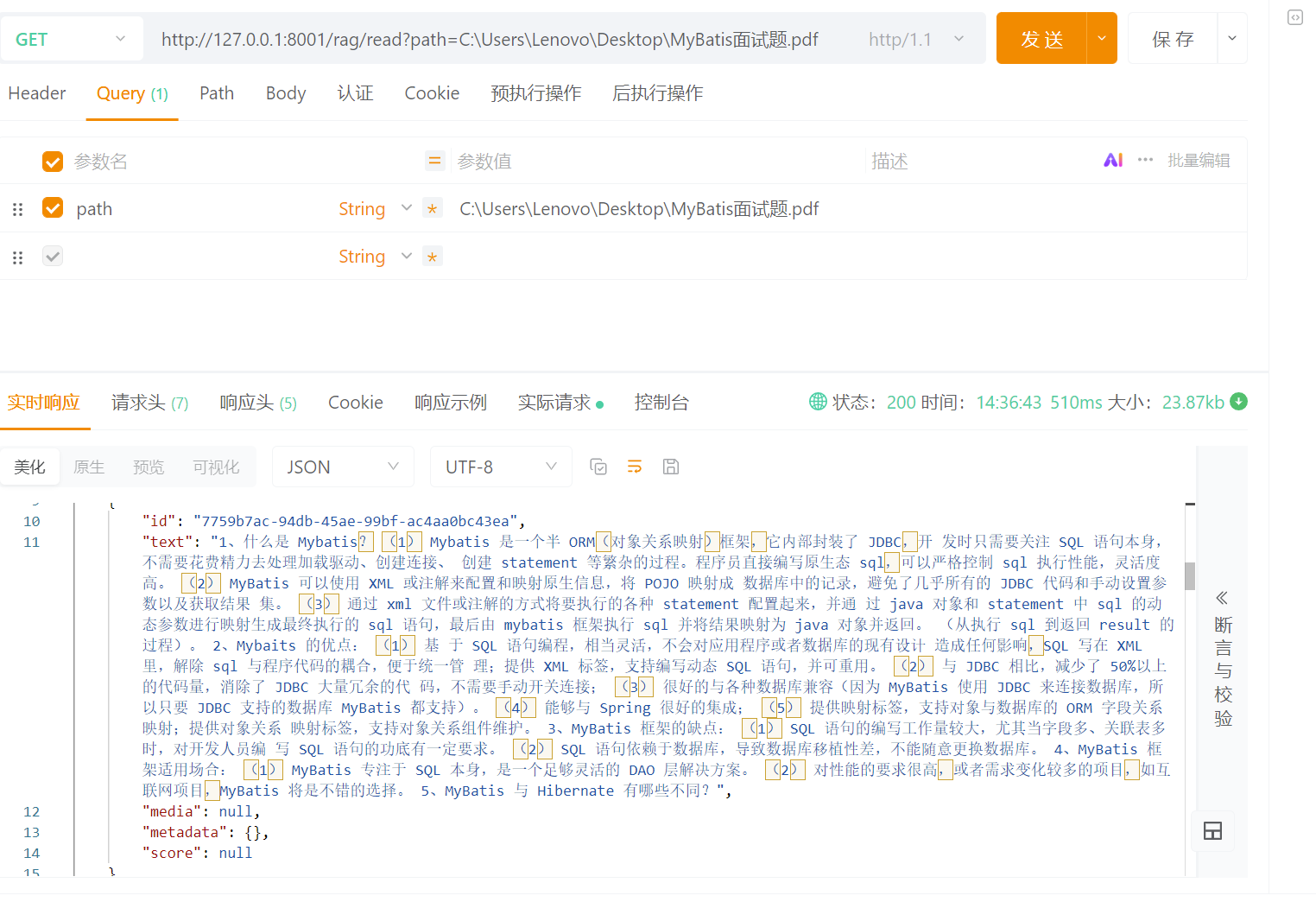
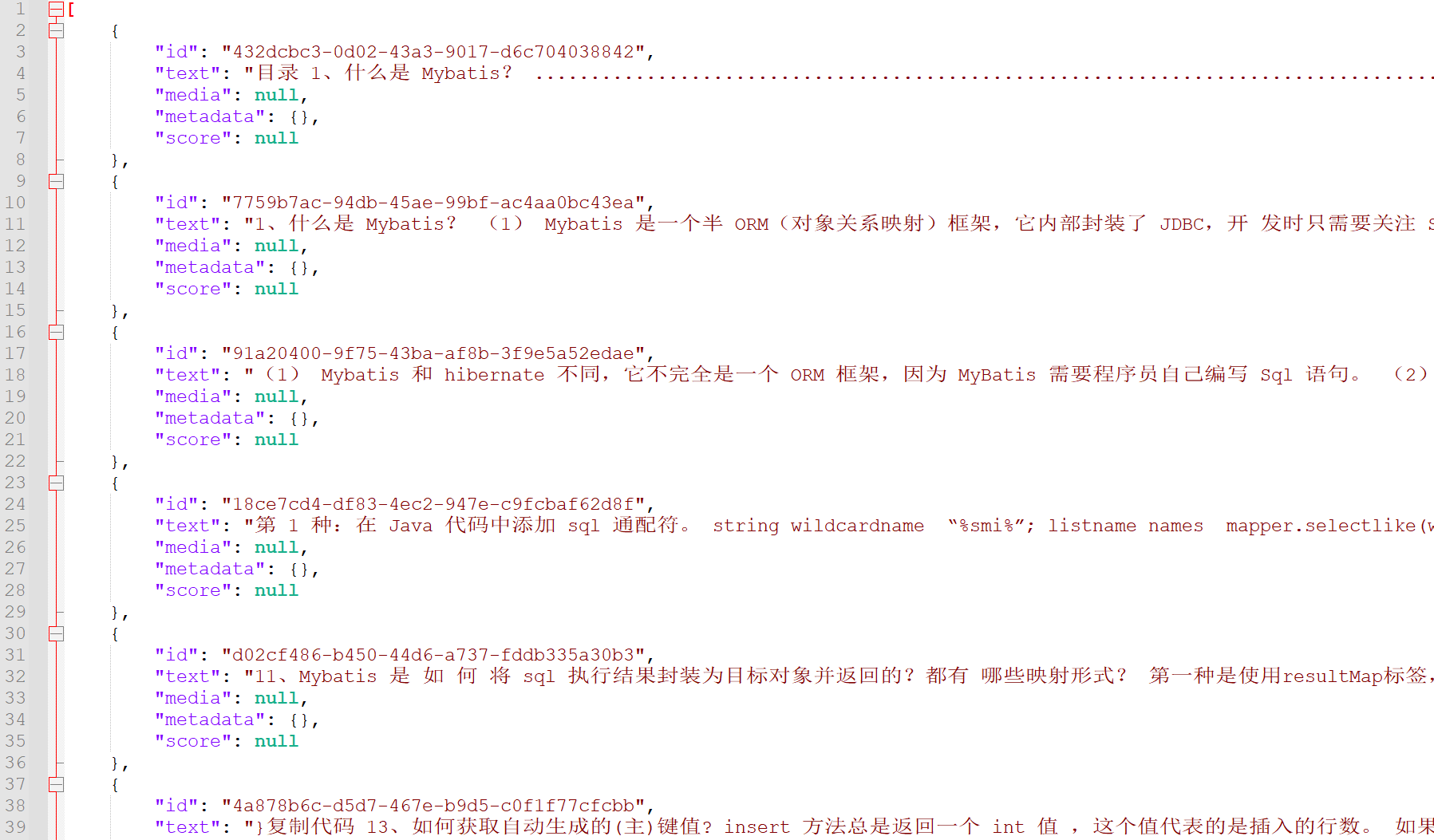 通过文本清洗,原始数据中的噪声、冗余和格式不一致问题得到了有效处理,文本内容变得更加规范、整洁。为后续的文档分片、向量化以及检索生成等环节提供了更高质量的基础支撑。