Human-in-the-Loop我们之前也讲过,这是一种允许在 Agent 执行过程中暂停、人工审查、交互确认后继续执行的机制。这一机制使得 AI Agent 可以在涉及敏感操作、信息缺失或需要人类决策的场景下安全、可控地运行。 前面在介绍ReAct Agent的实现原理的时候提到过,ReActAgent每一轮迭代只干2件事,推理和行动。 整个过程对应用层是自动运转的,agent.call(userMsg).block() 一次调用要么成功返回最终答案,要么抛异常。HITL 要解决的核心问题就一句话:怎么在这个全自动循环里安全地插入一个"暂停—等用户—继续"的缝隙。 注意"安全"二字 —— 暂停后 memory 里可能留着没填 result 的 ToolUseBlock,下一次调用必须能恢复,不能让模型看到悬空状态。
敏感动作前确认
HIL的一个最常见的场景:模型想调 delete_file,我希望先弹出 "确认/取消"。 在ReActAgent.reasoning() 里,看 510-543 行:
.flatMap(this::notifyPostReasoning)
.flatMap(event -> {
    Msg msg = event.getReasoningMessage();
    if (msg != null) memory.addMessage(msg);     // ① 先把推理结果写进 memory

    if (event.isStopRequested()) {                // ② 检查暂停标志
        return Mono.just(msg.withGenerateReason(
                GenerateReason.REASONING_STOP_REQUESTED));   // ③ 直接返回,不进 acting
    }
    ...
    return acting(iter);
});
这里面有一个暂停标记检查的动作,也就是说,如果这时候event.isStopRequested() 如果为true的话,那么就会直接进入HIL了, 那么这个event是啥呢?通过查看代码我们能知道他是PostReasoningEvent,而如果我们有一个Hook可以监听这个事件,并且把他的isStopRequested设置为true,就能触发HIL了。 于是我们可以这么做:
Hook confirmationHook = new Hook() {
    private static final List<String> SENSITIVE_TOOLS = List.of("delete_file", "send_email");

    @Override
    public <T extends HookEvent> Mono<T> onEvent(T event) {
        if (event instanceof PostReasoningEvent e) {
            Msg reasoningMsg = e.getReasoningMessage();
            List<ToolUseBlock> toolCalls = reasoningMsg.getContentBlocks(ToolUseBlock.class);

            // 如果包含敏感工具,暂停等待确认
            boolean hasSensitive = toolCalls.stream()
                .anyMatch(t -> SENSITIVE_TOOLS.contains(t.getName()));

            if (hasSensitive) {
                e.stopAgent();
            }
        }
        return Mono.just(event);
    }
};


ReActAgent agent = ReActAgent.builder()
    .name("Assistant")
    .model(model)
    .toolkit(toolkit)
    .hook(confirmationHook)
    .build();
通过PostReasoningEvent的stopAgent方法,来把isStopRequested设置为true:
public void stopAgent() {
    this.stopRequested = true;
}
Agent在执行时,如果触发了HIL用户拿到的 Msg 里一定带着 ToolUseBlock(还没执行),所以判断条件就是它。如果用户同意,则继续执行,否则提示失败。
Msg resp = agent.call(userMsg).block();

while (resp.hasContentBlocks(ToolUseBlock.class)) {
    showPendingToUser(resp);
    if (userClickYes()) {
        resp = agent.call().block();           // 无参 → 继续跑 acting
    } else {
        resp = agent.call(buildCancelMsg(resp)).block();  // 注入伪 result
    }
}
如果想要继续执行,会执行到acting方法中,而这个方法的第一句就是获取pending的ToolUseBlock,然后把他执行完。
private Mono<Msg> acting(int iter) {
        // Extract only pending tool calls (those without results in memory)
        List<ToolUseBlock> pendingToolCalls = extractPendingToolCalls();

}
关键动作后确认
前面是在执行前人工审查,但有的需求是工具已经跑完,结果也要给人审一遍(比如生成了一封邮件草稿,让人看完再决定要不要发下一步动作)。 ReActAgent.acting() 605-619 行:
return Flux.fromIterable(successPairs)
        .concatMap(this::notifyPostActingHook)   // 串行通知每个工具的 PostActing
        .last()                                  // 取最后一个事件
        .flatMap(event -> {
            if (event.isStopRequested()) {
                return Mono.just(event.getToolResultMsg()
                        .withGenerateReason(GenerateReason.ACTING_STOP_REQUESTED));
            }
            ...
        });
同样判断event.isStopRequested() ,如果为true,触发HIL。只不过这里的Event是PostActingEvent。
兜底策略
看完HIL的实现之后,不知道你会不会和我一样有个疑问:如果应用层忘了恢复怎么办? 比如暂停后用户直接刷新页面,新一轮发了一条普通问题进来。这时 memory 里还有"悬空的 ToolUseBlock",下一轮 reasoning 一进 LLM 就会报错。 为此ASJ默认搞了一个 PendingToolRecoveryHook(priority=10,最先跑):
private Mono<PreCallEvent> handlePreCall(PreCallEvent event) {
    Set<String> pendingIds = findPendingToolUseIds(memory);
    if (pendingIds.isEmpty()) return Mono.just(event);

    List<Msg> input = event.getInputMessages();

    // ① 输入为空 = 用户在用 agent.call() 恢复 → 不要管
    if (input == null || input.isEmpty()) return Mono.just(event);

    // ② 输入里已经有 ToolResult = 应用层自己处理过 → 不要管
    if (input.stream().anyMatch(m -> m.hasContentBlocks(ToolResultBlock.class)))
        return Mono.just(event);

    // ③ 否则注入合成 error result,避免崩溃
    patchPendingToolCalls(reactAgent, memory, pendingIds);
    return Mono.just(event);
}
它只在"用户没按规则恢复"时兜底。如果你做了完整的状态持久化(比如把 session 序列化到 DB),可以 Builder.enablePendingToolRecovery(false) 关掉,自己掌控。
Demo
import io.agentscope.core.ReActAgent;
import io.agentscope.core.formatter.dashscope.DashScopeChatFormatter;
import io.agentscope.core.hook.*;
import io.agentscope.core.memory.InMemoryMemory;
import io.agentscope.core.message.*;
import io.agentscope.core.model.DashScopeChatModel;
import io.agentscope.core.tool.*;
import java.util.List;
import java.util.Scanner;
import reactor.core.publisher.Mono;

public class HitlDemo {

    public static class Tools {
        @Tool(name = "delete_file", description = "Delete a file")
        public String del(@ToolParam(name = "filename") String f) {
            return "deleted " + f;
        }
        @Tool(name = "search_web", description = "Search the web")
        public String search(@ToolParam(name = "q") String q) {
            return "results for " + q;
        }
    }

    static class ConfirmHook implements Hook {
        static final List<String> SENSITIVE = List.of("delete_file");
        @Override public <T extends HookEvent> Mono<T> onEvent(T e) {
            if (e instanceof PostReasoningEvent p) {
                boolean dangerous = p.getReasoningMessage()
                        .getContentBlocks(ToolUseBlock.class).stream()
                        .anyMatch(t -> SENSITIVE.contains(t.getName()));
                if (dangerous) p.stopAgent();
            }
            return Mono.just(e);
        }
    }

    public static void main(String[] args) {
        Toolkit toolkit = new Toolkit();
        toolkit.registerTool(new Tools());

        ReActAgent agent = ReActAgent.builder()
                .name("SafeAgent")
                .model(DashScopeChatModel.builder()
                        .apiKey(System.getenv("DASHSCOPE_API_KEY"))
                        .modelName("qwen-plus").stream(true)
                        .formatter(new DashScopeChatFormatter()).build())
                .toolkit(toolkit)
                .memory(new InMemoryMemory())
                .hook(new ConfirmHook())
                .build();

        Scanner sc = new Scanner(System.in);
        while (true) {
            System.out.print("You: ");
            Msg userMsg = Msg.builder().role(MsgRole.USER)
                    .content(TextBlock.builder().text(sc.nextLine()).build()).build();
            Msg resp = agent.call(userMsg).block();

            while (resp != null && resp.hasContentBlocks(ToolUseBlock.class)) {
                System.out.println("⚠ Pending tools: " + resp.getContentBlocks(ToolUseBlock.class));
                System.out.print("Confirm? (y/n): ");
                if (sc.nextLine().equalsIgnoreCase("y")) {
                    resp = agent.call().block();   // 无参恢复
                } else {
                    List<ToolResultBlock> cancel = resp.getContentBlocks(ToolUseBlock.class).stream()
                            .map(t -> ToolResultBlock.of(t.getId(), t.getName(),
                                    TextBlock.builder().text("Cancelled").build()))
                            .toList();
                    Msg cancelMsg = Msg.builder().role(MsgRole.TOOL)
                            .content(cancel.toArray(new ToolResultBlock[0])).build();
                    resp = agent.call(cancelMsg).block();
                }
            }
            System.out.println("Agent: " + resp.getTextContent());
        }
    }
}
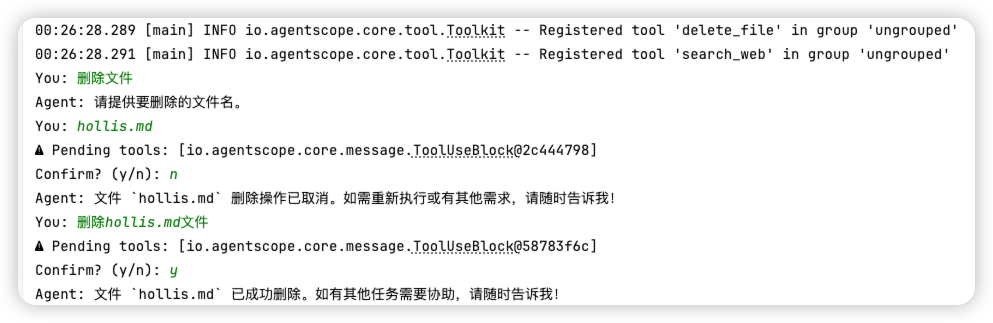
运行效果: